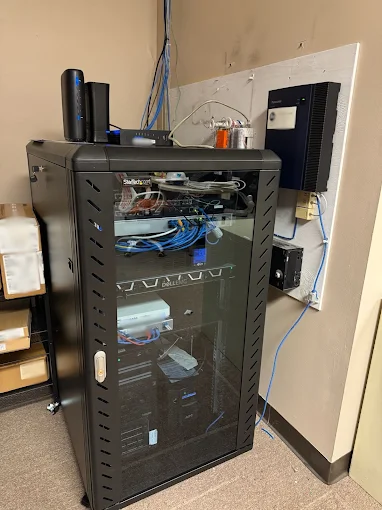

Managed IT can make a major difference for businesses that depend on computers, cloud tools, email, shared files, printers, security systems, and reliable internet access every day. Instead of waiting for something to break, managed IT focuses on keeping systems maintained, monitored, secure, and ready to support normal operations.
For businesses looking for computer help in centerville, ohio, managed IT can provide a more proactive way to handle technology problems, user support, maintenance, and planning.
The goal is not to add complexity. It is to make technology easier to manage so employees can stay productive and business owners can spend less time reacting to technical issues. These five tips can help organizations get more value from a managed IT relationship.
1. Start With a Clear Inventory of Your Technology
Good managed IT begins with knowing what your business actually uses.
That includes desktops, laptops, servers, networking equipment, printers, cloud applications, security tools, backup systems, mobile devices, and other connected hardware. It also helps to document which employees use which systems, what software is considered essential, and which devices are approaching replacement age.
Without a clear inventory, it is easy for old equipment, unsupported software, or forgotten user accounts to remain in the environment longer than they should.
A current inventory also makes troubleshooting faster. If a device fails, the support team already has useful information about the model, operating system, software, and role of the machine.
Businesses should update this information whenever equipment is replaced, software is added, or staffing changes. Technology environments evolve quickly, and documentation should evolve with them.
2. Treat Security as an Everyday IT Responsibility
Cybersecurity should not be handled only after something suspicious happens.
Managed IT can help businesses keep operating systems and applications updated, review endpoint protection, support multi-factor authentication, manage user permissions, and watch for unusual activity. These basic controls reduce common risks and can make it harder for attackers to move through an environment.
Password practices matter too. Employees should use unique passwords for important business accounts rather than reusing one password across several services. Multi-factor authentication adds another layer of protection if a password is stolen.
Phishing remains another major concern. Employees should know how to recognize unexpected login prompts, suspicious attachments, unusual payment requests, and messages that create artificial urgency.
Security is strongest when technology and employee habits work together. A managed IT provider can help with both the technical controls and the practical guidance users need.
3. Build a Backup and Recovery Plan Before You Need It
Backups are one of the most important parts of business continuity.
Hardware can fail, files can be deleted accidentally, devices can be stolen, and ransomware can make data unavailable. A reliable backup gives the business another path to recovery when something goes wrong.
Managed IT should help define what needs to be backed up, how often backups should run, where copies are stored, and how restoration will work.
Critical business data should not exist in only one place. Depending on the environment, organizations may use local backups, cloud backups, or a combination of both.
Backups should also be tested periodically. A backup that appears successful but cannot be restored is not much protection.
Recovery planning should go beyond files. Businesses should understand which systems are most important, how long they can reasonably be unavailable, and what steps are needed to restore normal operations after an outage.
Layer 2 Computers – Tech Support, Computer Repairs, and IT Services can help businesses think about support, repairs, security, backups, and technology maintenance as connected parts of the same IT strategy.
4. Use Monitoring and Maintenance to Catch Problems Early
The most valuable IT problem is often the one that gets fixed before employees notice it.
Managed IT can include routine monitoring of devices, storage capacity, system health, software updates, antivirus status, and other technical indicators. That visibility can help identify problems before they become major disruptions.
A nearly full storage drive, a device that repeatedly fails updates, or a computer running unusually hot may still function today but become a bigger issue later.
Preventive maintenance also helps reduce avoidable slowdowns. Removing outdated software, checking startup programs, installing trusted updates, and reviewing hardware health can keep systems more consistent.
This does not mean every warning requires an emergency response. The advantage is having enough information to prioritize issues before they affect productivity.
For small businesses, that can be especially valuable because one failed computer or network device may affect several employees at once.
5. Make IT Planning Part of Business Planning
Technology decisions should support the direction of the business.
If a company is hiring more employees, opening another location, adopting new software, or moving more work into the cloud, the IT environment should be prepared for those changes.
Managed IT can help businesses plan hardware purchases, software licensing, user accounts, network capacity, security controls, and replacement schedules before changes become urgent.
Budgeting is easier when equipment replacement is planned instead of unexpected. A business that knows several computers are nearing the end of their useful life can prepare for upgrades rather than replacing multiple machines during a crisis.
Planning also helps reduce compatibility problems. New applications may require more memory, newer operating systems, faster storage, or different security settings.
IT should not be treated as a separate technical department that reacts after business decisions are made. It works best when technology planning is included early.
Another useful step is to schedule regular technology reviews. A quarterly or semiannual review can help leaders compare current systems with upcoming business needs, recurring support issues, security concerns, and planned staffing changes. This gives the organization time to make thoughtful decisions instead of waiting until a device fails or a software requirement changes unexpectedly. Reviews can also reveal duplicated tools, unused licenses, aging equipment, or processes that employees have outgrown. When IT planning becomes part of normal business planning, technology spending is easier to prioritize, and the support team has a clearer roadmap for the months ahead, rather than constantly reacting to isolated problems each year.
Make Managed IT a Proactive Part of the Business
Managed IT is most effective when it shifts technology from a cycle of emergencies into a more predictable system of maintenance, support, security, and planning.
Businesses can get more value by keeping accurate technology records, strengthening everyday security, maintaining reliable backups, monitoring system health, and planning upgrades around future needs.
That approach can reduce downtime, improve consistency, and make it easier for employees to get help when something stops working.
It also creates a clearer picture of the business technology environment. Owners and managers can better understand which devices are aging, which systems are critical, where security needs improvement, and which upgrades deserve priority.
The goal is not to eliminate every technical problem. No IT environment can promise that. The goal is to reduce preventable issues, respond faster when problems occur, and build systems that support the business instead of slowing it down.
With a thoughtful managed IT plan, technology becomes easier to maintain, easier to secure, and easier to align with the way the business actually works.